Source: https://imdennie.com/case/numi.html
Updated: 2026-10-08
AI nutrition · iOS · Founder product
# Numi makes logging a meal cost one photo.
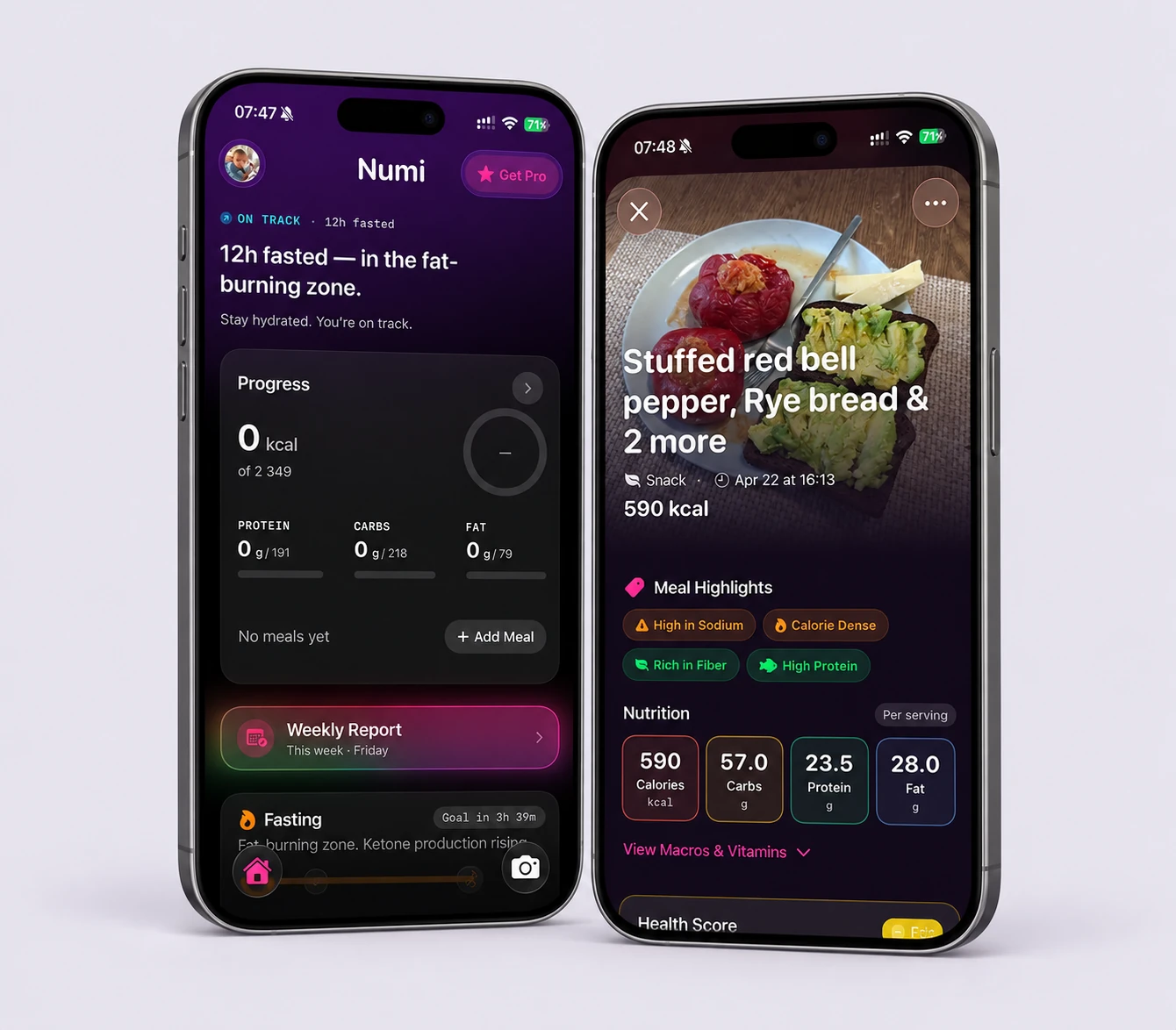
A nutrition app that kills the tap-tap-tap of manual food logging. Snap a photo, get calories, macros and micronutrients back — and a coach that speaks in plain language, not spreadsheets.
- **Role** · Founder, Product Designer & Engineer
- **Timeline** · 2025 → present
- **Platform** · iOS (SwiftUI)
- **Scope** · Concept → UX → UI → build → App Store
[ View on the App Store ](https://apps.apple.com/us/app/numi-eat-with-clarity/id6760961164) [ Visit getnumi.app ](https://getnumi.app) [How it was built ↓](https://imdennie.com/case/numi.html#build)
**01** — Overview
Most trackers ask you to search a database and do portion math three times a day. Numi’s bet is that the log has to disappear into a single tap — and that the numbers only matter if the app tells you what they mean.
My role: Founder · Design · Build
Team: Solo, with AI tooling
Surfaces: Logging · Insights · Fasting
Core tech: Vision AI · SwiftUI
Built with: AI coding tools · Xcode
Status: Released on the App Store
**02** — What I built and how I used AI
## One person, the whole product — with AI writing the first draft of the code.
What I owned, what the tools accelerated, and which calls stayed human. Two things are easy to blur here: Numi has AI inside the product (the photo analysis), and AI was used to build the product (the coding workflow). This section keeps them apart.
My responsibility: Product definition and positioning, UX and UI, the design system, the SwiftUI codebase, the photo-analysis and correction flows, testing on device, and the App Store submission and release.
Implementation: Native iOS app in Swift and SwiftUI, built in Xcode and released on the App Store. Meal photos are analyzed by a vision model; the health score is deterministic arithmetic over named inputs, not a model output; insights that cannot cite something real about the person’s day do not render.
AI-assisted development: AI coding tools generated first implementations from my flows — screens, state, the analysis request — so a design in the morning could be a working build on my phone by the evening. Iteration then happened in the real app, over real meals, not in a prototype.
My review and decisions: Which surfaces the model writes to and where a human confirms; the data model for meals, fasting and weight; reviewing, changing and testing generated code; what shipped in 1.0 and what waited.
Release status: Released on the App Store, 2025 → present. [View on the App Store](https://apps.apple.com/us/app/numi-eat-with-clarity/id6760961164)
One build loop, start to finish
1. **Rough flow.** Photo-first logging: shutter → analysis → result → save.
2. **AI-generated first implementation.** AI coding tools turned that flow into the first running SwiftUI screens and the vision request. The first version I built showed the analysis as a clean summary card, with editing behind a tap.
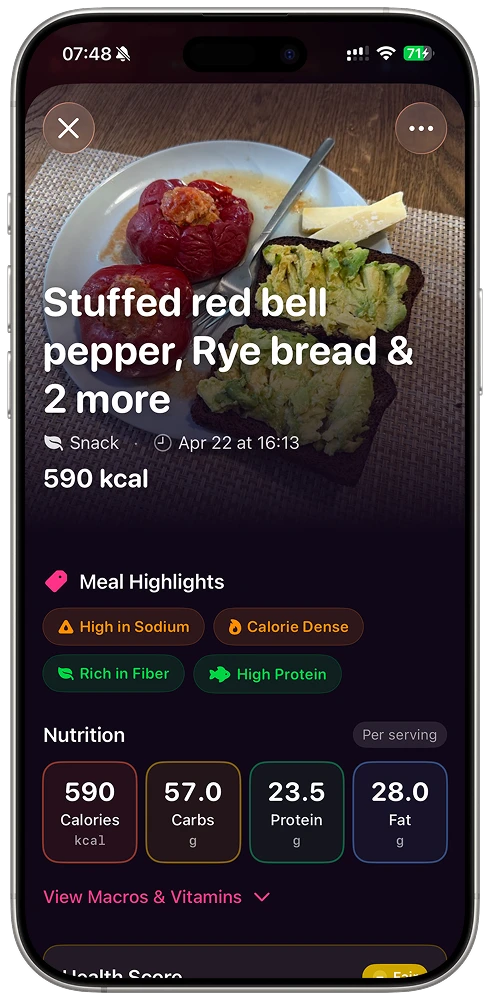
3. **What I changed.** In use, the finished look made people accept numbers that were sometimes 30% off on portion size — corrections dropped off. I rebuilt the result as a list where every item is adjustable in one tap, made confirmation an explicit action, and replaced the spinner with a staged reveal: reading the image → identifying items → estimating portions.
4. **Working result.** A multi-item dish logs from one photo in under ten seconds, every value is correctable in place, and the flow went through many working versions over real dinners before launch.
**A limitation I diagnosed and resolved:** the first natural-language input parsed a typed sentence and saved it straight away, with a toast. It read well in a screen recording and was worse than manual entry in practice, because a wrong field was stored silently. The fix was not a better prompt: the parse now renders as a filled form the user glances at and confirms before anything becomes real.
More on these decisions: [AI UX patterns that survive contact with a real model](https://imdennie.com/blog/ai-ux-patterns-that-survive-contact-with-a-real-model.html) and [what AI changed about shipping solo](https://imdennie.com/blog/shipping-apps-solo-with-ai.html).
**03** — The problem
## People don’t quit tracking because they stop caring. They quit because it’s work.
Every food diary starts the same way: motivated. Then real life hits — a rushed lunch, a shared plate, a dish with no barcode — and the friction compounds. Search, scroll, guess the grams, repeat. Within a couple of weeks most people just… stop.
So the real design problem was never “show more nutrition data.” It was protect the habit — make the first log of the day effortless, and make the data earn its place by changing what the person does next.
**04** — Product thinking
## Three bets the whole product leans on.
01
### Logging must be a reflex
If capturing a meal costs more than a photo, the habit dies. The camera is the primary action, everywhere.
02
### Numbers need a narrator
1,642 kcal means nothing on its own. Numi turns a week of data into a sentence you actually read.
03
### Respect the whole day
Eating, fasting, weight and hydration live on one home — because they’re one story, not four apps.
**05** — Who it’s for
## Two people I kept designing for.
Personas drawn from Numi’s audience — and the design beliefs that shaped how it works.
#### The lapsed tracker
Wants results without a second job
Has tried three other apps and abandoned each one around day 10. Will stay only if logging never feels like data entry. Success = still logging in week four.
#### The optimizer
Wants signal, not just a food diary
Already disciplined; cares about macros, fasting windows and trends. Will stay if the insights are sharper than what a spreadsheet gives them.
- “
People don’t quit tracking because they stop caring — they quit because it’s work. Friction is the enemy, not willpower.
- “
Users don’t want more charts; they want to be told one thing — “are you on track or not.”
- “
The bar for effortless: even a complex, multi-item dish logs in under 10 seconds from a single photo.
**06** — Key UX & UI decisions
## Where the product thinking became pixels.
Logging
### Every meal becomes a useful record
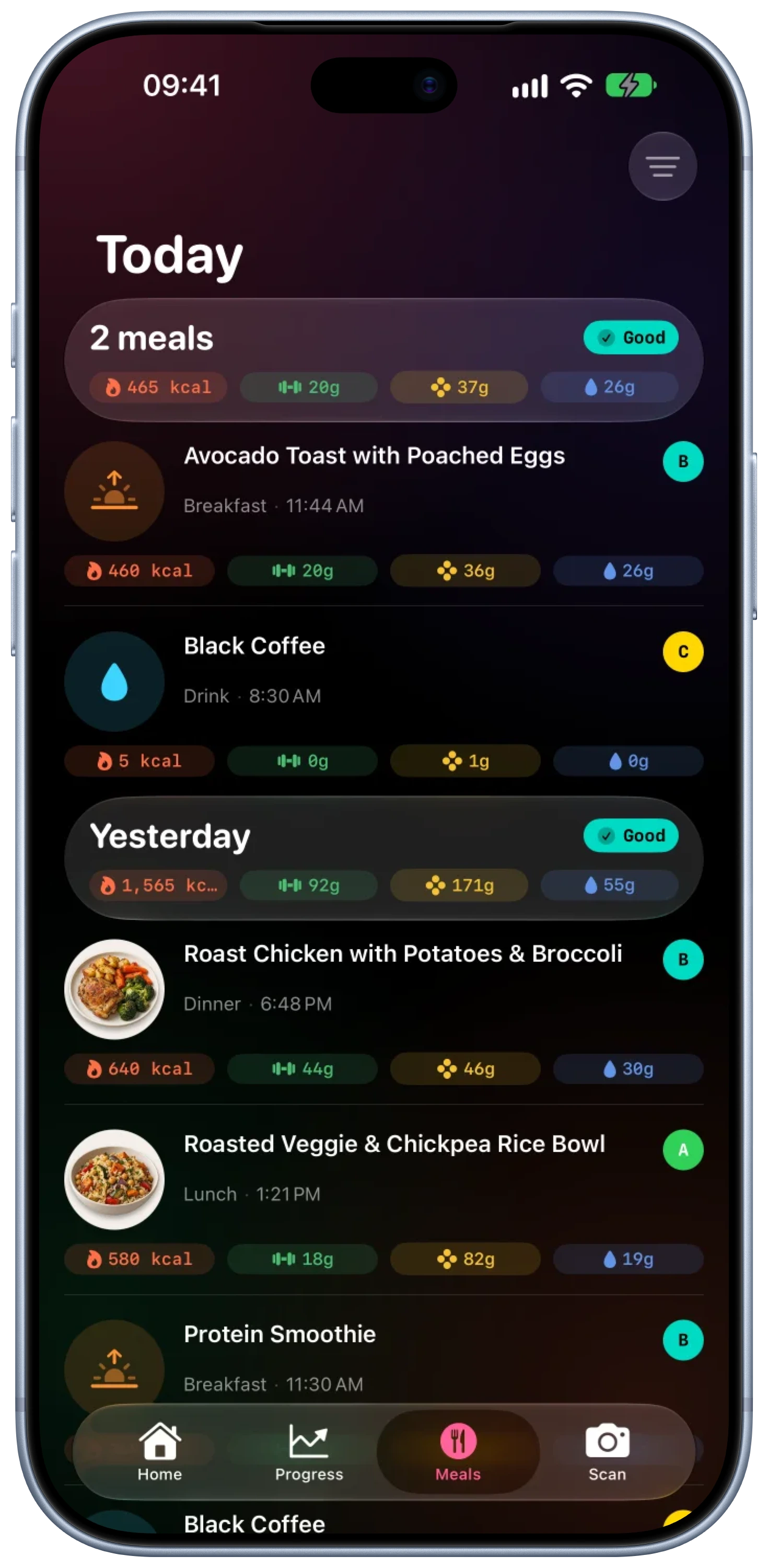
A persistent shutter button anchors the app. After a photo or a quick description, each meal lands in a readable history with calories, macros, timing and a simple quality grade. Yesterday’s choices become something the user can scan in seconds.
**Why it works:** the highest-friction moment of every tracker is now the lowest-effort one, so the habit survives real life.
Home
### One glance, one clear next move
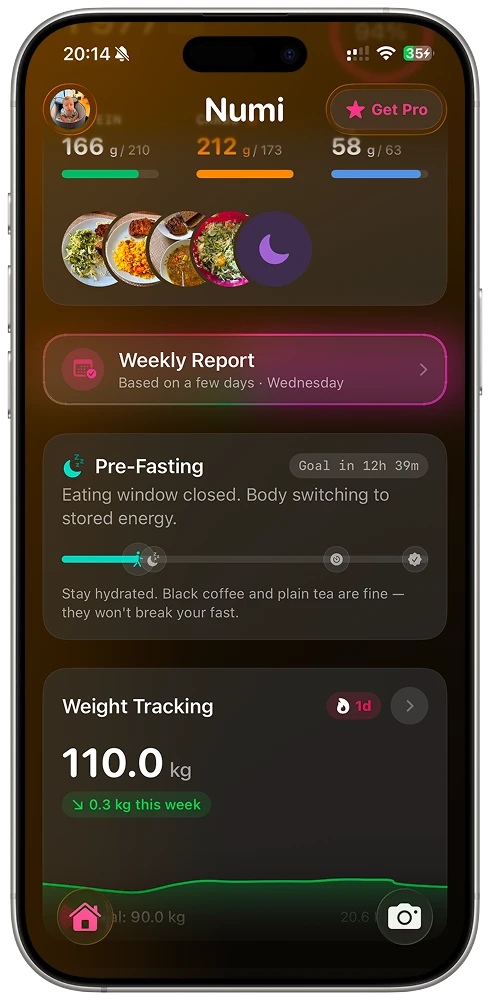
The home brings calories, macros, meal photos and the fasting state into one calm summary. The first sentence explains the day; the progress card gives the detail; the timeline shows what comes next.
**Why it works:** answers the only question most people have — “am I good?” — in under a second, then lets the curious drill in.
Insights
### A score with a reason behind it
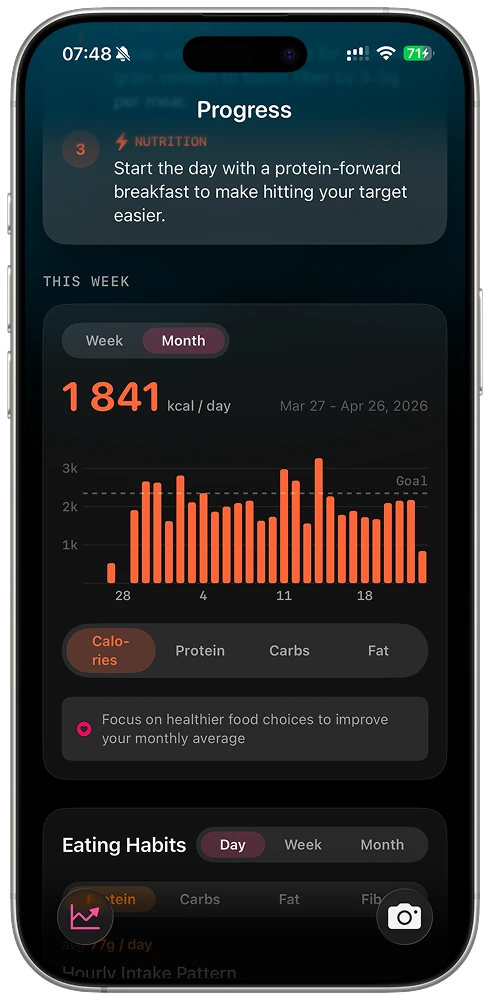
Instead of a wall of charts, Numi combines calories, macros, timing and consistency into one decision score. It explains the biggest opportunity in plain language, then connects the current pattern to a seven-day projection.
**Why it works:** insight only changes behavior if it’s understood; a sentence lands where a scatter plot doesn’t.
Fasting
### Fasting on the same timeline
The eating window lives on the home, not in a separate app — with a plain-English state (“eating window closed, body switching to stored energy”) and gentle guidance. Tracking and fasting stop competing for attention.
**Why it works:** one mental model for the whole day beats stitching together three single-purpose tools.
**07** — Design system
## A dark canvas so the food pops.
Numi runs on a near-black surface: real meal photos and saturated macro gradients do the talking, while big numerals and generous rounded cards keep dense data calm. Every metric maps to a fixed hue — protein, carbs, fat, hydration — so color itself becomes a legend you learn once.
Component language
- Macro rings
- Meal filmstrip
- Insight cards
- Timeline / window
- Big-numeral stats
- Shutter FAB
- Plain-language states
- Tabbed home
Reusable tokens and components meant the whole app could stay consistent while shipping fast — one designer-engineer, one system, no drift between concept and build.
**08** — Outcomes
## What shipped.
Numi is available on the App Store — designed, built, and shipped end to end.
Live
Available on the App Store
Photo
Zero-typing meal logging
<10s
To log a complex dish
1
Designer-engineer, end-to-end
**09** — More
## See it running, or read another study.
[ View on the App Store ](https://apps.apple.com/us/app/numi-eat-with-clarity/id6760961164) [ Visit getnumi.app ](https://getnumi.app) [All work](https://imdennie.com/#work)
[ Next case study Tysha — baby sleep ](https://imdennie.com/case/tysha.html) [ Case study Karta — restaurant platform ](https://imdennie.com/case/karta.html)